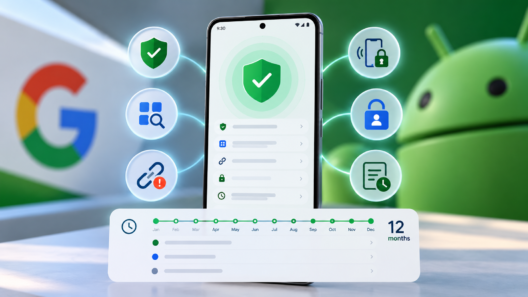

The changes were detailed on October 1 and are aimed at people who face higher risks, such as journalists and public figures, as well as Android users who want stronger device security. Advanced Protection gathers several settings under a single control. Google’s announcement says Android 17 devices get the new features, with USB Protection and Failed Authentication Lock limited to select Android 17 devices. USB Protection is also available on Pixel 6 and newer phones.
Google’s feature overview describes the changes as additions introduced since Advanced Protection launched with Android 16. The company says users already enrolled will receive a notification when the capabilities reach their device. Intrusion Logging requires a separate opt-in, so turning on Advanced Protection alone does not enable the forensic record.
Intrusion Logging keeps a year of records
Intrusion Logging records security and network events, then encrypts the information end to end and stores it in the cloud. Google says the logs are designed to resist tampering and remain accessible only to the user. The service keeps a rolling 12 months of data and deletes older records automatically.
That record could help someone investigate activity after suspecting spyware or another compromise. A person examining a phone may find that important evidence has been erased locally. Google’s approach stores the logs away from the device, though the company has not published a complete list of every event the log captures in its feature announcement. It says the tool was developed with civil liberties and press freedom organizations, including Amnesty International and Reporters Without Borders.
Keeping that information is a trade-off. Intrusion Logging creates a longer record of device activity, so Google has made it optional and gives it a separate manual switch. People who do not expect to need forensic records can leave it off, while journalists or others worried about targeted surveillance can decide whether the added trail is useful to them.
USB and app permissions get tighter limits
USB Protection addresses attempts to access a locked phone through a connected accessory or charging station. A new USB connection defaults to charging only while the device is locked. An accessory already connected before the screen locks can continue working, according to Google. The setting is available on Pixel 6 and newer devices and on some Android 17 models.
Advanced Protection also narrows access to Android’s accessibility services. Those services let assistive tools interact with what appears on screen, but they can also be abused by malicious apps to read information or perform actions. With the mode enabled on Android 17, Google says only verified apps categorized as accessibility tools can use the service. The restriction is meant to retain legitimate assistive technology while blocking apps outside that category.
Another Android 17 setting disables WebGPU in Chrome while Advanced Protection is active. WebGPU supports high-performance graphics in websites. Google says turning it off reduces exposure to browser-based attacks, although it may also affect sites or web apps that rely on the feature.
Failed attempts trigger a stronger lockout
Failed Authentication Lock responds to repeated unsuccessful authentication attempts in settings or secured apps. The device locks down to stop someone from continuing to probe protected areas. Google’s overview says this safeguard is limited to select Android 17 devices. The Verge’s report on the update likewise notes the lockout and places it among existing Advanced Protection controls against unauthorized USB access and misuse of accessibility features.
Google is also adding a settings page that lists apps able to detect whether Advanced Protection is enabled. Apps can use that signal to activate their own protections for users in the mode. The page gives people a way to see which installed apps participate, rather than leaving that relationship hidden in the background.
Availability depends on the phone and Android version, and Google has not provided a complete model-by-model list for the two limited features. Users can check the Advanced Protection section in Android’s security settings for a notification when the additions become available. Anyone who wants Intrusion Logging must switch it on there separately.

Sooraj Raj is a programmer, blogger and professional developer with an interest in technology research and publishing. He writes about technology developments and shares information in a clear, straightforward way.